
What is Odoo CRM? If you’ve ever lost track of a promising lead because it got buried in someone’s inbox, you already understand why businesses need a proper CRM. Odoo CRM is built to solve exactly that problem and if you’re new to it, this guide will walk you through what it actually does, how it works, and why so many growing businesses choose it over the traditional CRM platforms they started with.
We work with sales teams every week who come to us frustrated with spreadsheets, sticky notes, or CRM tools that promised simplicity but delivered complexity instead. Odoo CRM tends to be a breath of fresh air for them, mainly because it doesn’t try to be everything at once it just handles the sales process well, and it connects naturally to the rest of your business operations.
By the end of this guide, you’ll have a clear, practical understanding of what Odoo CRM is, how it compares to traditional systems, and whether it’s the right fit for where your business is today.
What is Odoo CRM?
Odoo CRM is the customer relationship management module within the broader Odoo ERP suite. It’s designed to help sales teams manage leads, track opportunities, and move prospects through a sales pipeline from that very first contact all the way to a closed deal.
What sets Odoo CRM apart from many standalone CRM tools is that it’s not an isolated app. Because it lives inside the same platform as your accounting, inventory, and invoicing modules, your sales data automatically connects to the rest of your operations. When someone asks “what is Odoo CRM” for the first time, the simplest answer is this: it’s the sales engine of Odoo, built to give your team visibility and structure without forcing them to juggle multiple disconnected systems.
What is Odoo CRM and Why Does It Matter?
When business owners first ask “what is Odoo CRM,” the simplest way to explain it is this: it’s the sales management engine built directly into the Odoo platform. Understanding what is Odoo CRM becomes easier once you realize it’s not a separate product it’s part of the same system that runs your accounting and inventory. That’s exactly why so many businesses researching what is Odoo CRM end up choosing it over standalone tools.
What is Odoo CRM Best Used For?
If you’re still figuring out what is Odoo CRM best suited for, the answer is straightforward: managing leads, tracking opportunities, and organizing your sales pipeline in one place. Sales managers who understand what is Odoo CRM capable of tend to use it not just for tracking deals, but for forecasting revenue with real data. For growing teams, what is Odoo CRM really comes down to is structure — replacing scattered spreadsheets with one connected system.
Common Questions Around What is Odoo CRM
A lot of the confusion around what is Odoo CRM comes from comparing it to traditional standalone CRM platforms. Once you see how naturally it connects to the rest of your business operations, what is Odoo CRM stops being a confusing question and starts making practical sense. That clarity is usually what convinces businesses to move forward with implementation.
Why Businesses Need a CRM System
Before diving deeper into Odoo CRM specifically, it’s worth pausing on why a CRM matters at all. Without one, sales information lives in someone’s head, a shared spreadsheet, or scattered email threads. Follow-ups get missed. Deals stall because nobody remembers where a conversation left off. Managers have no reliable way to forecast revenue because there’s no structured view of the pipeline.
A CRM system centralizes all of that. It gives your team a shared, accurate picture of every lead and every opportunity, and it removes the guesswork from sales management. This is exactly the gap Odoo CRM is built to close.
Key Features of Odoo CRM
Lead Management
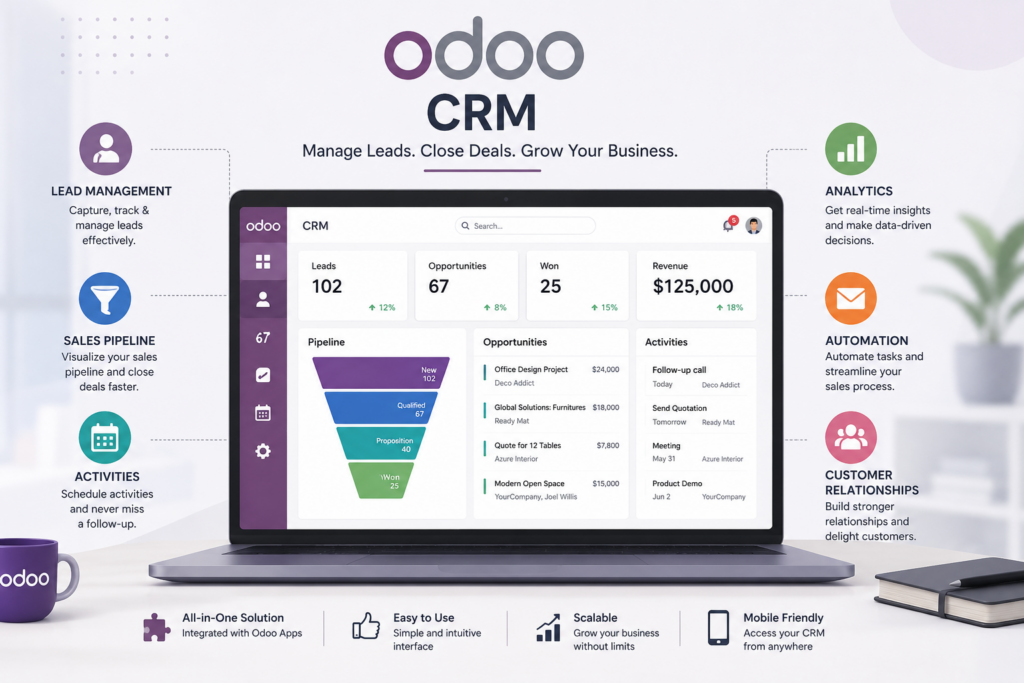
Odoo CRM captures leads automatically from your website, email, or third-party integrations, and organizes them in one place. Instead of leads landing in a random inbox, Odoo CRM assigns, tags, and routes them based on rules you define, so nothing slips through unnoticed.
Opportunity Tracking
Once a lead shows genuine interest, Odoo CRM converts it into an opportunity a structured record that tracks expected revenue, probability of closing, and the specific next steps needed to move the deal forward.
Sales Pipeline Management
The visual, drag-and-drop pipeline is one of the most practical parts of Odoo CRM. Sales reps can see exactly where every deal stands, and managers get a real-time view of the entire pipeline without asking for a status update.
Activity Scheduling
Odoo CRM lets reps schedule calls, meetings, and follow-up tasks directly on each opportunity, with reminders that keep deals moving instead of going cold.
Reporting and Analytics
Built-in dashboards in Odoo CRM show conversion rates, average deal size, and team performance, giving sales managers the data they need to coach their team and forecast revenue with more confidence.
Automation Features
Odoo CRM includes automation rules that handle repetitive work assigning leads, sending follow-up emails, updating stages based on activity freeing up reps to spend more time actually selling.
Benefits of Using Odoo CRM
- Centralized customer data — every interaction, note, and email tied to a single contact record.
- Better sales visibility — managers can see pipeline health at a glance instead of chasing updates.
- Seamless integration — Odoo CRM connects directly with invoicing, inventory, and marketing tools within the same platform.
- Scalability — Odoo CRM grows with your team, from a two-person sales desk to a multi-region sales organization.
- Lower total cost — because Odoo CRM is part of the broader Odoo ecosystem, businesses often avoid paying for a separate, disconnected CRM subscription.
How Odoo CRM Works
In practice, Odoo CRM follows a simple flow: a lead comes in, gets qualified, becomes an opportunity, moves through pipeline stages, and eventually closes as a won or lost deal. Along the way, every email, call, and meeting is logged automatically against that record.
What makes Odoo CRM particularly useful is what happens after the deal closes. Because it’s connected to the rest of Odoo, a won opportunity can flow directly into a sales order, an invoice, and inventory allocation without anyone re-entering the same information twice.
Odoo CRM for Small Businesses
For small businesses, Odoo CRM often replaces a messy combination of spreadsheets and email folders. Teams that adopt Odoo CRM early tend to build good sales habits from day one logging activities, tracking follow-ups, and forecasting realistically instead of trying to retrofit discipline onto a system later.
Cost matters here too. Because Odoo CRM is priced reasonably and scales with your team size, small businesses aren’t locked into an expensive, feature-heavy CRM platform they’ll only partially use.
Odoo CRM for Growing Companies
As a company grows, sales processes get more complex multiple teams, territories, and products all need their own pipeline logic. Odoo CRM handles this well, supporting multiple sales teams, custom pipeline stages, and detailed performance reporting across the organization.
Growing companies also benefit from how Odoo CRM ties into other departments. Marketing campaigns, customer support tickets, and finance data all connect back to the same customer record, giving leadership a genuinely unified view of the business rather than fragments spread across different tools.
Odoo CRM vs Traditional CRM Systems
Traditional CRM systems are often standalone products that require separate integrations to connect with accounting, inventory, or marketing tools. Odoo CRM avoids that problem entirely because it’s part of one connected platform from the start.
Traditional systems can also come with steep per-user pricing and complex setup processes. Odoo CRM tends to be more approachable for growing businesses, both in terms of cost and implementation time, especially when it’s set up correctly from the beginning by an experienced Odoo consulting partner.
That said, traditional CRM platforms sometimes offer deeper industry-specific features for very large enterprises. For most small and mid-sized businesses, though, Odoo CRM covers the core sales management needs without the overhead of a heavier, disconnected system.
Odoo CRM Implementation Best Practices
Getting real value out of Odoo CRM depends heavily on how it’s set up. A few practices consistently make the difference:
- Map your actual sales process first — don’t configure Odoo CRM around a generic template; build pipeline stages that reflect how your team really sells.
- Clean your existing data before migration — importing messy contact lists into Odoo CRM just carries the mess forward.
- Train your team early — adoption is the single biggest factor in whether a CRM implementation succeeds.
- Automate gradually — start with a few automation rules in Odoo CRM and expand once the team is comfortable.
- Integrate with existing tools — connecting Odoo CRM with your website, email, and marketing tools from day one avoids manual double-entry later.
Businesses that treat Odoo CRM implementation as a proper project — rather than a quick software install — tend to see faster adoption and better long-term results.
Common Challenges and Solutions
Challenge: Low adoption from sales reps. Reps often resist a new CRM if it feels like extra admin work. The fix is configuring Odoo CRM around their actual workflow, not against it, so logging activity feels natural rather than forced.
Challenge: Messy or duplicate data. Without cleanup, Odoo CRM inherits every bad habit from your old system. A structured data migration, ideally handled by an Odoo customization or implementation specialist, solves this before it becomes a long-term headache.
Challenge: Underused automation. Many teams set up Odoo CRM and never touch the automation features again. Revisiting automation rules every few months keeps the system working for the team, not just sitting idle.
Final Thoughts on Odoo CRM
Odoo CRM isn’t the flashiest CRM on the market, and it doesn’t try to be. What it does well is give sales teams a structured, connected system that fits naturally into the rest of the business without the cost and complexity of stitching together separate tools. For businesses that want a CRM that actually gets used, rather than one that looks impressive in a demo and gets abandoned three months later, Odoo CRM is worth serious consideration.
Frequently Asked Questions
What is Odoo CRM used for?
Odoo CRM is used to manage leads, track sales opportunities, and organize a sales pipeline from first contact through closed deal.
Is Odoo CRM free?
The Community edition includes a version of Odoo CRM with core functionality at no license cost, while Enterprise adds advanced automation and reporting features through a paid subscription.
How is Odoo CRM different from Salesforce or HubSpot?
Odoo CRM is part of a fully integrated ERP suite, so it connects natively with accounting, inventory, and other business modules, whereas traditional platforms often require separate integrations to achieve the same connectivity.
Can small businesses use Odoo CRM?
Yes. Odoo CRM scales from small sales teams to large, multi-department organizations, making it a practical option regardless of company size.
Does Odoo CRM support automation?
Yes,what is Odoo CRM includes automation rules for lead assignment, follow-up emails, and pipeline stage updates, reducing manual administrative work for sales teams.
Do I need a consultant to implement Odoo CRM?
It’s not strictly required, but working with an experienced Odoo consulting partner significantly improves setup quality, data migration, and long-term adoption.
One Last Word on What is Odoo CRM
By now, the question of what is Odoo CRM should feel a lot less abstract. It’s simply the tool that keeps your sales process organized, connected, and easy to manage as your business grows. Anyone still weighing what is Odoo CRM against other options usually finds that the real deciding factor isn’t features it’s how well the system fits into daily sales work without adding extra friction by what is odoo crm.
Ready to Put Odoo CRM to Work for Your Sales Team?
Every sales team we’ve worked with has slightly different needs, and getting the most out of Odoo CRM starts with understanding yours. From initial setup to full Odoo CRM implementation and ongoing optimization, our team can help you build a system your sales reps will actually want to use.